MinerU PDF解析工具:从安装配置到本地部署与API调用的全流程指南

@[TOC](MinerU PDF解析工具:从安装配置到本地部署与API调用的全流程指南)
MinerU

MinerU

由上海人工智能实验室开源的高质量PDF解析工具,能精准地将包含图片、公式、表格的复杂PDF转换为Markdown和JSON等机器可读的格式。

💻 安装准备

在开始安装前,需要做好以下准备工作:

  • 系统环境:确保你的系统是 Windows、Linux 或 macOS

  • Python版本:请安装 Python 3.10 到 3.13 之间的版本,这是稳定运行的前提。

  • 虚拟环境(推荐):强烈建议使用Conda或Venv创建一个独立的Python虚拟环境,以避免包冲突。

    1
    2
    3
    # 使用Conda创建环境示例
    conda create -n mineru_env python=3.11
    conda activate mineru_env
  • 硬件要求

    • CPU:推荐8核心以上。
    • 内存:推荐32GB。
    • GPU(可选):如果需要进行GPU加速,推荐使用NVIDIA Turing架构及以上(如RTX 20/30/40系列)且显存不小于8GB的显卡,并确保已安装合适版本的CUDA驱动。

📦 详细安装步骤

MinerU使用 HuggingFaceModelScope 作为模型仓库,用户可以根据需要切换模型源或使用本地模型。

  • HuggingFace 是默认的模型源,在全球范围内提供了优异的加载速度和极高稳定性。
  • ModelScope 是中国大陆地区用户的最佳选择,提供了无缝兼容的SDK模块,适用于无法访问HuggingFace的用户。

方法一:使用pip或uv安装MinerU

  1. 安装MinerU
    在激活的虚拟环境中,执行以下命令安装MinerU。国内用户建议使用国内镜像源以加速下载。

    1
    2
    3
    4
    5
    # 使用阿里云镜像安装
    pip install --upgrade pip -i https://mirrors.aliyun.com/pypi/simple
    pip install uv -i https://mirrors.aliyun.com/pypi/simple
    uv pip install -U "mineru[core]" -i https://mirrors.aliyun.com/pypi/simple
    # uv 是一个用 Rust 编写的高速 Python 包管理器和项目工作流工具,由 Astral 公司开发(也是 Ruff 的开发者)。它旨在替代 pip、pip-tools、virtualenv、poetry 等工具,提供极快的性能和现代化的开发体验。
  2. 下载模型
    MinerU的功能依赖预训练模型,安装后需要下载模型文件。

    1
    2
    # 默认从Huggingface下载,国内网络可能较慢
    mineru-models-download

    国内用户,更推荐使用Modelscope源,速度更快:

    1
    2
    3
    4
    5
    6
    7
    8
    9
    # 通过环境变量切换
    # 在任何情况下可以通过设置环境变量来切换模型源,这适用于所有命令行工具和API调用。
    export MINERU_MODEL_SOURCE=modelscope
    # 查看
    echo $MINERU_MODEL_SOURCE
    mineru-models-download
    # 或
    import os
    os.environ["MINERU_MODEL_SOURCE"] = "modelscope"

其余方法可参考官网:快速开始 - MinerU

⚙️ 配置本地模型路径

让MINERU使用本地模型,主要通过修改其配置文件来实现。

  1. 找到或创建配置文件:MINERU的配置文件通常是 mineru.jsonmagic-pdf.json 。它可能位于你的用户主目录(例如 C:\Users\用户名\mineru.json )或项目目录下。如果不存在,你可以根据模板创建一个 。

  2. 编辑配置文件:在配置文件中,你需要指定本地模型文件的位置。关键在于正确设置 models-dir 字段 。

    如果你的Pipeline模式和VLM模式模型存放在不同路径,可以这样配置:

    1
    2
    3
    4
    5
    6
    {
    "models-dir": {
    "pipeline": "/path/to/your/pipeline/models",
    "vlm": "/path/to/your/vlm/models"
    }
    }

    如果所有模型都在同一个目录下,可以直接指定根路径:

    1
    2
    3
    {
    "models-dir": "/path/to/your/all/models"
    }
    1
    2
    3
    4
    5
    6
    7
    8
    9
    10
    11
    12
    13
    14
    15
    16
    17
    18
    19
    20
    21
    22
    23
    24
    25
    26
    27
    28
    29
    30
    31
    32
    33
    34
    35
    36
    37
    38
    {
    "bucket_info": {
    "bucket-name-1": [
    "ak",
    "sk",
    "endpoint"
    ],
    "bucket-name-2": [
    "ak",
    "sk",
    "endpoint"
    ]
    },
    "latex-delimiter-config": {
    "display": {
    "left": "$$",
    "right": "$$"
    },
    "inline": {
    "left": "$",
    "right": "$"
    }
    },
    "llm-aided-config": {
    "title_aided": {
    "api_key": "your_api_key",
    "base_url": "https://dashscope.aliyuncs.com/compatible-mode/v1",
    "model": "qwen3-next-80b-a3b-instruct",
    "enable_thinking": false,
    "enable": false
    }
    },
    "models-dir": {
    "pipeline": "D:\\modelscope\\hub\\models\\OpenDataLab\\PDF-Extract-Kit-1___0",
    "vlm": "D:\\modelscope\\hub\\models\\OpenDataLab\\MinerU2___5-2509-1___2B"
    },
    "config_version": "1.3.1"
    }

🚀 使用本地模型

  • 设置环境变量:通过设置环境变量 MINERU_MODEL_SOURCE=local,告诉MINERU从本地路径读取模型 。

    1
    export MINERU_MODEL_SOURCE=local
  • Docker部署时的注意事项:如果你通过Docker部署,需要在启动容器时,将存放本地模型的目录挂载到容器内部,并在容器内正确设置上述环境变量和配置文件路径 。

配置选项

语言支持

1
2
3
# 支持的语言
['ch', 'ch_server', 'ch_lite', 'en', 'korean', 'japan',
'chinese_cht', 'ta', 'te', 'ka']

后端选项详解

Pipeline 后端

  • 特点:通用性强,支持多种文档类型
  • 方法选项
    • auto:自动选择
    • txt:文本提取
    • ocr:OCR识别

VLM 后端(视觉语言模型)

  • vlm-transformers:通用VLM
  • vlm-vllm-engine:高性能推理引擎
  • vlm-http-client:HTTP客户端模式
  • vlm-mlx-engine:macOS优化引擎

输出文件类型

  1. 可视化文件

    • {filename}_layout.pdf - 布局边界框
    • {filename}_span.pdf - 文本跨度边界框
  2. 内容文件

    • {filename}.md - Markdown格式
    • {filename}_content_list.json - 结构化内容
  3. 中间文件

    • {filename}_middle.json - 中间结果
    • {filename}_model.json - 模型原始输出

Python调用示例

1
2
3
4
5
6
7
8
9
10
11
12
13
14
15
16
17
18
19
20
21
22
23
24
25
26
27
28
29
30
31
32
33
34
35
36
37
38
39
40
41
42
43
44
45
46
47
48
49
50
51
52
53
54
55
56
57
58
59
60
61
62
63
64
65
66
67
68
69
70
71
72
73
74
75
76
77
78
79
80
81
82
83
84
85
86
87
88
89
90
91
92
93
94
95
96
97
98
99
100
101
102
103
104
105
106
107
108
109
110
111
112
113
114
115
116
117
118
119
120
121
122
123
124
125
126
127
128
129
130
131
132
133
134
135
136
137
138
139
140
141
142
143
144
145
146
147
148
149
150
151
152
153
154
155
156
157
158
159
160
161
162
163
164
165
166
167
168
169
170
171
172
173
174
175
176
177
178
179
180
181
182
183
184
185
186
187
188
189
190
191
192
193
194
195
196
197
198
199
200
201
202
203
204
205
206
207
208
209
210
211
212
213
214
215
216
217
218
219
220
221
222
223
224
225
226
227
228
229
230
231
232
233
234
235
236
import os
import copy
import json
from pathlib import Path
from loguru import logger
from mineru.cli.common import convert_pdf_bytes_to_bytes_by_pypdfium2, prepare_env, read_fn
from mineru.data.data_reader_writer import FileBasedDataWriter
from mineru.utils.draw_bbox import draw_layout_bbox, draw_span_bbox
from mineru.utils.enum_class import MakeMode
from mineru.backend.vlm.vlm_analyze import doc_analyze as vlm_doc_analyze
from mineru.backend.pipeline.pipeline_analyze import doc_analyze as pipeline_doc_analyze
from mineru.backend.pipeline.pipeline_middle_json_mkcontent import union_make as pipeline_union_make
from mineru.backend.pipeline.model_json_to_middle_json import result_to_middle_json as pipeline_result_to_middle_json
from mineru.backend.vlm.vlm_middle_json_mkcontent import union_make as vlm_union_make
from mineru.utils.guess_suffix_or_lang import guess_suffix_by_path


def do_parse(
output_dir, # Output directory for storing parsing results
pdf_file_names: list[str], # List of PDF file names to be parsed
pdf_bytes_list: list[bytes], # List of PDF bytes to be parsed
p_lang_list: list[str], # List of languages for each PDF, default is 'ch' (Chinese)
backend="pipeline", # The backend for parsing PDF, default is 'pipeline'
parse_method="auto", # The method for parsing PDF, default is 'auto'
formula_enable=True, # Enable formula parsing
table_enable=True, # Enable table parsing
server_url=None, # Server URL for vlm-http-client backend
f_draw_layout_bbox=True, # Whether to draw layout bounding boxes
f_draw_span_bbox=True, # Whether to draw span bounding boxes
f_dump_md=True, # Whether to dump markdown files
f_dump_middle_json=True, # Whether to dump middle JSON files
f_dump_model_output=True, # Whether to dump model output files
f_dump_orig_pdf=True, # Whether to dump original PDF files
f_dump_content_list=True, # Whether to dump content list files
f_make_md_mode=MakeMode.MM_MD, # The mode for making markdown content, default is MM_MD
start_page_id=0, # Start page ID for parsing, default is 0
end_page_id=None, # End page ID for parsing, default is None (parse all pages until the end of the document)
):

if backend == "pipeline":
for idx, pdf_bytes in enumerate(pdf_bytes_list):
new_pdf_bytes = convert_pdf_bytes_to_bytes_by_pypdfium2(pdf_bytes, start_page_id, end_page_id)
pdf_bytes_list[idx] = new_pdf_bytes

infer_results, all_image_lists, all_pdf_docs, lang_list, ocr_enabled_list = pipeline_doc_analyze(pdf_bytes_list, p_lang_list, parse_method=parse_method, formula_enable=formula_enable,table_enable=table_enable)

for idx, model_list in enumerate(infer_results):
model_json = copy.deepcopy(model_list)
pdf_file_name = pdf_file_names[idx]
local_image_dir, local_md_dir = prepare_env(output_dir, pdf_file_name, parse_method)
image_writer, md_writer = FileBasedDataWriter(local_image_dir), FileBasedDataWriter(local_md_dir)

images_list = all_image_lists[idx]
pdf_doc = all_pdf_docs[idx]
_lang = lang_list[idx]
_ocr_enable = ocr_enabled_list[idx]
middle_json = pipeline_result_to_middle_json(model_list, images_list, pdf_doc, image_writer, _lang, _ocr_enable, formula_enable)

pdf_info = middle_json["pdf_info"]

pdf_bytes = pdf_bytes_list[idx]
_process_output(
pdf_info, pdf_bytes, pdf_file_name, local_md_dir, local_image_dir,
md_writer, f_draw_layout_bbox, f_draw_span_bbox, f_dump_orig_pdf,
f_dump_md, f_dump_content_list, f_dump_middle_json, f_dump_model_output,
f_make_md_mode, middle_json, model_json, is_pipeline=True
)
else:
if backend.startswith("vlm-"):
backend = backend[4:]

f_draw_span_bbox = False
parse_method = "vlm"
for idx, pdf_bytes in enumerate(pdf_bytes_list):
pdf_file_name = pdf_file_names[idx]
pdf_bytes = convert_pdf_bytes_to_bytes_by_pypdfium2(pdf_bytes, start_page_id, end_page_id)
local_image_dir, local_md_dir = prepare_env(output_dir, pdf_file_name, parse_method)
image_writer, md_writer = FileBasedDataWriter(local_image_dir), FileBasedDataWriter(local_md_dir)
middle_json, infer_result = vlm_doc_analyze(pdf_bytes, image_writer=image_writer, backend=backend, server_url=server_url)

pdf_info = middle_json["pdf_info"]

_process_output(
pdf_info, pdf_bytes, pdf_file_name, local_md_dir, local_image_dir,
md_writer, f_draw_layout_bbox, f_draw_span_bbox, f_dump_orig_pdf,
f_dump_md, f_dump_content_list, f_dump_middle_json, f_dump_model_output,
f_make_md_mode, middle_json, infer_result, is_pipeline=False
)


def _process_output(
pdf_info,
pdf_bytes,
pdf_file_name,
local_md_dir,
local_image_dir,
md_writer,
f_draw_layout_bbox,
f_draw_span_bbox,
f_dump_orig_pdf,
f_dump_md,
f_dump_content_list,
f_dump_middle_json,
f_dump_model_output,
f_make_md_mode,
middle_json,
model_output=None,
is_pipeline=True
):
"""处理输出文件"""
if f_draw_layout_bbox:
draw_layout_bbox(pdf_info, pdf_bytes, local_md_dir, f"{pdf_file_name}_layout.pdf")

if f_draw_span_bbox:
draw_span_bbox(pdf_info, pdf_bytes, local_md_dir, f"{pdf_file_name}_span.pdf")

if f_dump_orig_pdf:
md_writer.write(
f"{pdf_file_name}_origin.pdf",
pdf_bytes,
)

image_dir = str(os.path.basename(local_image_dir))

if f_dump_md:
make_func = pipeline_union_make if is_pipeline else vlm_union_make
md_content_str = make_func(pdf_info, f_make_md_mode, image_dir)
md_writer.write_string(
f"{pdf_file_name}.md",
md_content_str,
)

if f_dump_content_list:
make_func = pipeline_union_make if is_pipeline else vlm_union_make
content_list = make_func(pdf_info, MakeMode.CONTENT_LIST, image_dir)
md_writer.write_string(
f"{pdf_file_name}_content_list.json",
json.dumps(content_list, ensure_ascii=False, indent=4),
)

if f_dump_middle_json:
md_writer.write_string(
f"{pdf_file_name}_middle.json",
json.dumps(middle_json, ensure_ascii=False, indent=4),
)

if f_dump_model_output:
md_writer.write_string(
f"{pdf_file_name}_model.json",
json.dumps(model_output, ensure_ascii=False, indent=4),
)

logger.info(f"local output dir is {local_md_dir}")


def parse_doc(
path_list: list[Path],
output_dir,
lang="ch",
backend="pipeline",
method="auto",
server_url=None,
start_page_id=0,
end_page_id=None
):
"""
Parameter description:
path_list: List of document paths to be parsed, can be PDF or image files.
output_dir: Output directory for storing parsing results.
lang: Language option, default is 'ch', optional values include['ch', 'ch_server', 'ch_lite', 'en', 'korean', 'japan', 'chinese_cht', 'ta', 'te', 'ka']。
Input the languages in the pdf (if known) to improve OCR accuracy. Optional.
Adapted only for the case where the backend is set to "pipeline"
backend: the backend for parsing pdf:
pipeline: More general.
vlm-transformers: More general.
vlm-vllm-engine: Faster(engine).
vlm-http-client: Faster(client).
without method specified, pipeline will be used by default.
method: the method for parsing pdf:
auto: Automatically determine the method based on the file type.
txt: Use text extraction method.
ocr: Use OCR method for image-based PDFs.
Without method specified, 'auto' will be used by default.
Adapted only for the case where the backend is set to "pipeline".
server_url: When the backend is `http-client`, you need to specify the server_url, for example:`http://127.0.0.1:30000`
start_page_id: Start page ID for parsing, default is 0
end_page_id: End page ID for parsing, default is None (parse all pages until the end of the document)
"""
try:
file_name_list = []
pdf_bytes_list = []
lang_list = []
for path in path_list:
file_name = str(Path(path).stem)
pdf_bytes = read_fn(path)
file_name_list.append(file_name)
pdf_bytes_list.append(pdf_bytes)
lang_list.append(lang)
do_parse(
output_dir=output_dir,
pdf_file_names=file_name_list,
pdf_bytes_list=pdf_bytes_list,
p_lang_list=lang_list,
backend=backend,
parse_method=method,
server_url=server_url,
start_page_id=start_page_id,
end_page_id=end_page_id
)
except Exception as e:
logger.exception(e)


if __name__ == '__main__':
"""如果您由于网络问题无法下载模型,可以设置环境变量MINERU_MODEL_SOURCE为modelscope使用免代理仓库下载模型"""
os.environ["MINERU_MODEL_SOURCE"] = "local" # "modelscope"
# args
__dir__ = os.path.dirname(os.path.abspath(__file__))
pdf_files_dir = os.path.join(__dir__, "picture")
output_dir = os.path.join(__dir__, "output_MinerU")
pdf_suffixes = ["pdf"]
image_suffixes = ["png", "jpeg", "jp2", "webp", "gif", "bmp", "jpg"]

doc_path_list = []
for doc_path in Path(pdf_files_dir).glob('*'):
if guess_suffix_by_path(doc_path) in pdf_suffixes + image_suffixes:
doc_path_list.append(doc_path)

"""Use pipeline mode if your environment does not support VLM"""
parse_doc(doc_path_list, output_dir, backend="pipeline")

"""To enable VLM mode, change the backend to 'vlm-xxx'"""
# parse_doc(doc_path_list, output_dir, backend="vlm-transformers") # more general.
# parse_doc(doc_path_list, output_dir, backend="vlm-mlx-engine") # faster than transformers in macOS 13.5+.
# parse_doc(doc_path_list, output_dir, backend="vlm-vllm-engine") # faster(engine).
# parse_doc(doc_path_list, output_dir, backend="vlm-http-client", server_url="http://127.0.0.1:30000") # faster(client).

核心函数解析

1. do_parse() - 主解析函数

1
2
3
4
5
6
7
8
9
10
11
12
13
14
15
16
17
18
19
20
21
22
23
24
25
26
27
28
29
30
31
32
33
34
35
36
37
output_dir:解析结果的输出目录路径

pdf_file_names:要解析的PDF文件名列表(字符串列表)

pdf_bytes_list:要解析的PDF字节数据列表(字节列表)

p_lang_list:每个PDF对应的语言列表,默认是中文('ch')

backend:解析PDF的后端引擎,默认'pipeline'

parse_method:解析方法,默认'auto'(自动选择)

formula_enable:是否启用公式解析,默认True

table_enable:是否启用表格解析,默认True

server_url:VLM HTTP客户端后端使用的服务器URL

f_draw_layout_bbox:是否绘制布局边界框,默认True

f_draw_span_bbox:是否绘制文本跨度边界框,默认True

f_dump_md:是否输出Markdown文件,默认True

f_dump_middle_json:是否输出中间JSON文件,默认True

f_dump_model_output:是否输出模型原始输出文件,默认True

f_dump_orig_pdf:是否输出原始PDF文件,默认True

f_dump_content_list:是否输出内容列表文件,默认True

f_make_md_mode:生成Markdown内容的模式,默认是MM_MD

start_page_id:解析起始页码,默认0(第一页)

end_page_id:解析结束页码,默认None(解析到文档末尾)

支持两种后端模式:

  • pipeline 后端:通用解析,支持 OCR 和文本提取
  • vlm 后端:基于视觉语言模型,支持多种推理引擎

2. _process_output() - 输出处理函数

1
2
3
4
5
6
7
8
9
10
11
12
13
14
15
16
17
18
19
20
def _process_output(
pdf_info, # PDF信息字典
pdf_bytes, # PDF字节数据
pdf_file_name, # PDF文件名
local_md_dir, # 本地Markdown目录
local_image_dir, # 本地图像目录
md_writer, # Markdown写入器
f_draw_layout_bbox, # 是否绘制布局边界框
f_draw_span_bbox, # 是否绘制跨度边界框
f_dump_orig_pdf, # 是否转储原始PDF
f_dump_md, # 是否转储Markdown
f_dump_content_list,# 是否转储内容列表
f_dump_middle_json, # 是否转储中间JSON
f_dump_model_output,# 是否转储模型输出
f_make_md_mode, # Markdown生成模式
middle_json, # 中间JSON数据
model_output=None, # 模型原始输出
is_pipeline=True # 是否为pipeline后端
):
"""处理输出文件"""

3. parse_doc() - 用户接口函数

1
2
3
4
5
6
7
8
9
10
def parse_doc(
path_list: list[Path], # 要解析的文档路径列表
output_dir, # 解析结果输出目录
lang="ch", # 语言选项,默认是中文
backend="pipeline", # 解析后端,默认pipeline
method="auto", # 解析方法,默认auto
server_url=None, # 服务器URL(用于vlm-http-client)
start_page_id=0, # 起始页码
end_page_id=None # 结束页码
):

提供简化的用户接口,支持多种语言和解析配置。

使用Docker部署Mineru

一、Docker镜像构建

1.1 下载与构建镜像

1
2
wget https://gcore.jsdelivr.net/gh/opendatalab/MinerU@master/docker/china/Dockerfile
docker build -t mineru:latest -f Dockerfile .

1.2 Dockerfile配置说明

1
2
3
4
5
6
7
8
9
10
11
12
13
14
15
16
17
18
19
20
21
22
23
24
25
26
27
28
29
# 基础镜像选择(根据GPU架构选择)
# 计算能力≥8.0(Ampere及以上架构)
FROM docker.m.daocloud.io/vllm/vllm-openai:v0.10.1.1

# 计算能力<8.0(Turing及更早架构)
# FROM docker.m.daocloud.io/vllm/vllm-openai:v0.10.2

# 配置Ubuntu国内镜像源并安装依赖
RUN sed -i 's/archive.ubuntu.com/mirrors.aliyun.com/g' /etc/apt/sources.list && \
sed -i 's/security.ubuntu.com/mirrors.aliyun.com/g' /etc/apt/sources.list && \
apt-get update && \
apt-get install -y \
fonts-noto-core \
fonts-noto-cjk \
fontconfig \
libgl1 && \
fc-cache -fv && \
apt-get clean && \
rm -rf /var/lib/apt/lists/*

# 安装Mineru核心包
RUN python3 -m pip install -U 'mineru[core]' -i https://mirrors.aliyun.com/pypi/simple --break-system-packages && \
python3 -m pip cache purge

# 下载模型文件
RUN /bin/bash -c "mineru-models-download -s modelscope -m all"

# 设置入口点
ENTRYPOINT ["/bin/bash", "-c", "export MINERU_MODEL_SOURCE=local && exec \"$@\"", "--"]

GPU架构说明

  • 查看GPU计算能力:CUDA GPU列表
  • vLLM v0.10.1.1 支持计算能力≥8.0的显卡
  • vLLM v0.10.2 支持更早架构的显卡

二、启动Docker容器

2.1 基础启动命令

1
docker run --gpus all --shm-size 32g -p 30000:30000 -p 7860:7860 -p 8000:8000 --ipc=host -it mineru:latest /bin/bash

2.2 端口映射说明

  • 30000: OpenAI兼容服务器端口
  • 7860: Gradio WebUI端口
  • 8000: FastAPI接口端口

2.3 vLLM加速要求

使用vLLM加速VLM模型推理需满足:

  1. 硬件要求:Volta及以上架构GPU,显存≥8GB
  2. 驱动要求:NVIDIA驱动支持CUDA 12.8+
  3. 容器配置:已正确挂载GPU设备

2.4 容器停止后如何重新启动服务

1
2
3
4
5
# 启动指定容器
docker start <容器ID或名称>

# 进入容器交互终端
docker exec -it <容器ID或名称> /bin/bash

2.5 通过配置环境变量来使用本地模型

1
export MINERU_MODEL_SOURCE=local

三、服务启动与使用

3.1 启动OpenAI兼容服务器

1
2
3
4
5
6
7
8
# 默认启动(自动选择引擎)
mineru-openai-server

# 指定vLLM引擎
mineru-openai-server --engine vllm --port 30000

# 指定lmdeploy引擎
mineru-openai-server --engine lmdeploy --server-port 30000

3.2 启动FastAPI服务

1
mineru-api --host 0.0.0.0 --port 8000

访问API文档:http://127.0.0.1:8000/docs

3.3 启动Gradio WebUI

1
2
3
4
5
6
7
8
# 通用后端
mineru-gradio --server-name 0.0.0.0 --server-port 7860

# 启用vLLM加速
mineru-gradio --server-name 0.0.0.0 --server-port 7860 --enable-vllm-engine true

# 启用lmdeploy加速
mineru-gradio --server-name 0.0.0.0 --server-port 7860 --enable-lmdeploy-engine true

访问WebUI:http://127.0.0.1:7860

3.4 HTTP客户端调用

1
2
# 连接到OpenAI兼容服务器
mineru -p <input_path> -o <output_path> -b vlm-http-client -u http://127.0.0.1:30000

3.5 所有vllm/lmdeploy官方支持的参数都可用通过命令行参数传递给 MinerU,包括以下命令:mineru、mineru-openai-server、mineru-gradio、mineru-api

1
mineru-openai-server --engine vllm --port 30000 --gpu-memory-utilization 0.8 --max-model-len 7520 --max-num-batched-tokens 32768

MinerU 在 Docker 中部署时出现 CUDA 错误:flash-attn 兼容性问题与解决方案

在 Windows 系统下使用 RTX 5060 显卡通过 Docker 部署 MinerU 时,可能出现以下 CUDA 相关错误,导致服务启动失败:

1
2
CUDA error (/__w/xformers/xformers/third_party/flash-attention/hopper/flash_fwd_launch_template.h:188): invalid argument
RuntimeError: Engine core initialization failed. See root cause above.

该错误通常与 vllm-flash-attn 在视觉模块中存在兼容性问题有关,系统已自动回退至 xformers 后端。为解决此问题,可尝试手动安装正确版本的 flash-attn


解决方案:安装 flash-attn

通过以下命令安装指定版本的 flash-attn:

1
2
3
pip install flash-attn==2.8.3
# --verbose 是 pip 命令的一个可选参数,用于显示详细的安装过程信息。
pip install flash-attn==2.8.3 --verbose

若安装过程缓慢,可直接从以下链接下载预编译的 wheel 文件,并放入 Docker 容器中安装:

1
2
# 安装过程信息会显示安装的哪个版本
https://github.com/Dao-AILab/flash-attention/releases/download/v2.8.3/flash_attn-2.8.3+cu12torch2.7cxx11abiTRUE-cp312-cp312-linux_x86_64.whl

下载后,在 Docker 内执行:

1
pip install /path/to/flash_attn-2.8.3+cu12torch2.7cxx11abiTRUE-cp312-cp312-linux_x86_64.whl

MinerU 输出文件说明

mineru 命令执行后,除了输出主要的 markdown 文件外,还会生成多个辅助文件用于调试、质检和进一步处理。

可视化调试文件

  • 模型输出(使用原始输出):
    • model.json
  • 调试和验证(使用可视化文件):
    • layout.pdf
    • spans.pdf
  • 内容提取(使用简化文件):
    • *.md
    • content_list.json
  • 二次开发(使用结构化文件):
    • middle.json

布局分析文件 (layout.pdf)

文件命名格式{原文件名}_layout.pdf

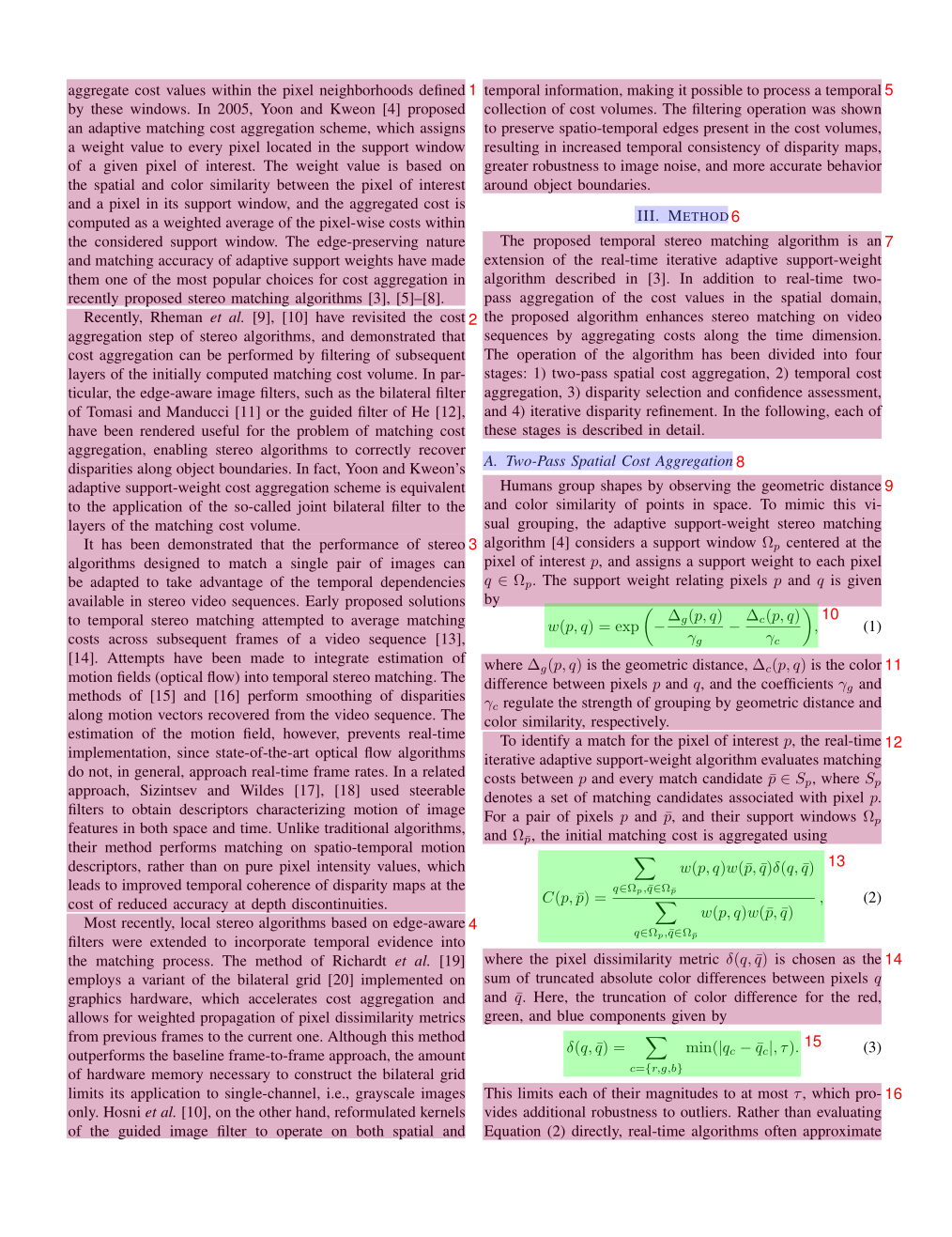
功能说明

  • 可视化展示每一页的布局分析结果
  • 每个检测框右上角的数字表示阅读顺序
  • 使用不同背景色块区分不同类型的内容块

使用场景

  • 检查布局分析是否正确
  • 确认阅读顺序是否合理
  • 调试布局相关问题

layout 页面示例

文本片段文件 (spans.pdf)

仅适用于 pipeline 后端

文件命名格式{原文件名}_spans.pdf

功能说明

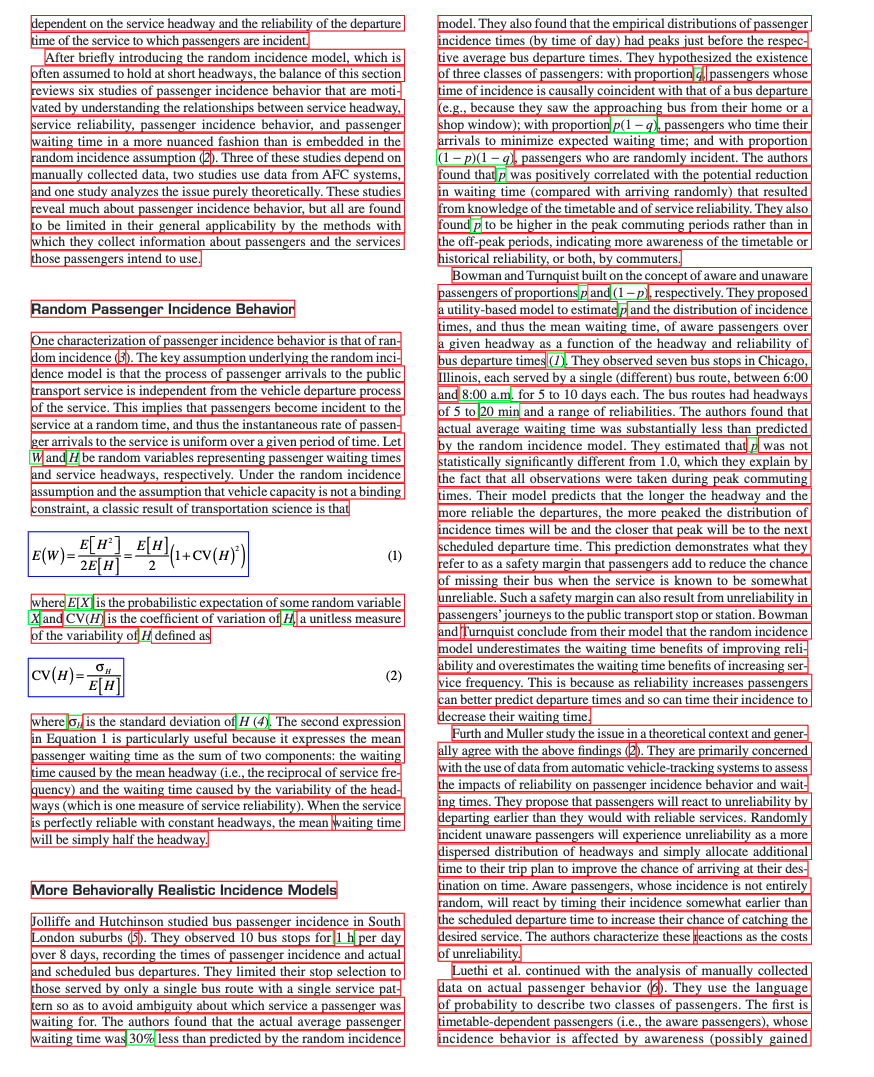
  • 根据 span 类型使用不同颜色线框标注页面内容
  • 用于质量检查和问题排查

使用场景

  • 快速排查文本丢失问题
  • 检查行内公式识别情况
  • 验证文本分割准确性

span 页面示例

结构化数据文件

pipeline 后端 输出结果

模型推理结果 (model.json)

文件命名格式{原文件名}_model.json

数据结构定义
1
2
3
4
5
6
7
8
9
10
11
12
13
14
15
16
17
18
19
20
21
22
23
24
25
26
27
28
29
30
31
32
33
34
35
36
37
38
39
40
from pydantic import BaseModel, Field
from enum import IntEnum

class CategoryType(IntEnum):
"""内容类别枚举"""
title = 0 # 标题
plain_text = 1 # 文本
abandon = 2 # 包括页眉页脚页码和页面注释
figure = 3 # 图片
figure_caption = 4 # 图片描述
table = 5 # 表格
table_caption = 6 # 表格描述
table_footnote = 7 # 表格注释
isolate_formula = 8 # 行间公式
formula_caption = 9 # 行间公式的标号
embedding = 13 # 行内公式
isolated = 14 # 行间公式
text = 15 # OCR 识别结果

class PageInfo(BaseModel):
"""页面信息"""
page_no: int = Field(description="页码序号,第一页的序号是 0", ge=0)
height: int = Field(description="页面高度", gt=0)
width: int = Field(description="页面宽度", ge=0)

class ObjectInferenceResult(BaseModel):
"""对象识别结果"""
category_id: CategoryType = Field(description="类别", ge=0)
poly: list[float] = Field(description="四边形坐标,格式为 [x0,y0,x1,y1,x2,y2,x3,y3]")
score: float = Field(description="推理结果的置信度")
latex: str | None = Field(description="LaTeX 解析结果", default=None)
html: str | None = Field(description="HTML 解析结果", default=None)

class PageInferenceResults(BaseModel):
"""页面推理结果"""
layout_dets: list[ObjectInferenceResult] = Field(description="页面识别结果")
page_info: PageInfo = Field(description="页面元信息")

# 完整的推理结果
inference_result: list[PageInferenceResults] = []
坐标系统说明

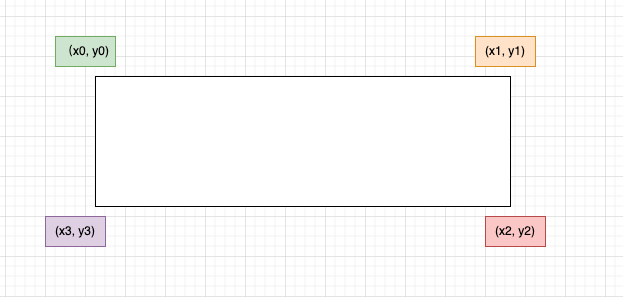
poly 坐标格式:[x0, y0, x1, y1, x2, y2, x3, y3]

  • 分别表示左上、右上、右下、左下四点的坐标
  • 坐标原点在页面左上角

poly 坐标示意图

示例数据
1
2
3
4
5
6
7
8
9
10
11
12
13
14
15
16
17
18
19
20
21
22
23
24
25
26
27
28
29
30
31
32
33
34
35
36
37
38
39
40
41
42
43
44
45
46
47
48
[
{
"layout_dets": [
{
"category_id": 2,
"poly": [
99.1906967163086,
100.3119125366211,
730.3707885742188,
100.3119125366211,
730.3707885742188,
245.81326293945312,
99.1906967163086,
245.81326293945312
],
"score": 0.9999997615814209
}
],
"page_info": {
"page_no": 0,
"height": 2339,
"width": 1654
}
},
{
"layout_dets": [
{
"category_id": 5,
"poly": [
99.13092803955078,
2210.680419921875,
497.3183898925781,
2210.680419921875,
497.3183898925781,
2264.78076171875,
99.13092803955078,
2264.78076171875
],
"score": 0.9999997019767761
}
],
"page_info": {
"page_no": 1,
"height": 2339,
"width": 1654
}
}
]
中间处理结果 (middle.json)

文件命名格式{原文件名}_middle.json

顶层结构
字段名 类型 说明
pdf_info list[dict] 每一页的解析结果数组
_backend string 解析模式:pipelinevlm
_version_name string MinerU 版本号
页面信息结构 (pdf_info)
字段名 说明
preproc_blocks PDF 预处理后的未分段中间结果
page_idx 页码,从 0 开始
page_size 页面的宽度和高度 [width, height]
images 图片块信息列表
tables 表格块信息列表
interline_equations 行间公式块信息列表
discarded_blocks 需要丢弃的块信息
para_blocks 分段后的内容块结果
块结构层次
1
2
3
4
一级块 (table | image)
└── 二级块
└── 行 (line)
└── 片段 (span)
一级块字段
字段名 说明
type 块类型:tableimage
bbox 块的矩形框坐标 [x0, y0, x1, y1]
blocks 包含的二级块列表
二级块字段
字段名 说明
type 块类型(详见下表)
bbox 块的矩形框坐标
lines 包含的行信息列表
二级块类型
类型 说明
image_body 图像本体
image_caption 图像描述文本
image_footnote 图像脚注
table_body 表格本体
table_caption 表格描述文本
table_footnote 表格脚注
text 文本块
title 标题块
index 目录块
list 列表块
interline_equation 行间公式块
行和片段结构

行 (line) 字段: - bbox:行的矩形框坐标 - spans:包含的片段列表

片段 (span) 字段: - bbox:片段的矩形框坐标 - type:片段类型(imagetabletextinline_equationinterline_equation) - content | img_path:文本内容或图片路径

示例数据
1
2
3
4
5
6
7
8
9
10
11
12
13
14
15
16
17
18
19
20
21
22
23
24
25
26
27
28
29
30
31
32
33
34
35
36
37
38
39
40
41
42
43
44
45
46
47
48
49
50
51
52
53
54
55
56
57
58
59
60
61
62
63
64
65
66
67
68
69
70
71
72
73
74
75
76
77
78
79
80
81
82
83
84
85
86
87
88
89
90
91
92
93
94
95
96
97
98
{
"pdf_info": [
{
"preproc_blocks": [
{
"type": "text",
"bbox": [
52,
61.956024169921875,
294,
82.99800872802734
],
"lines": [
{
"bbox": [
52,
61.956024169921875,
294,
72.0000228881836
],
"spans": [
{
"bbox": [
54.0,
61.956024169921875,
296.2261657714844,
72.0000228881836
],
"content": "dependent on the service headway and the reliability of the departure ",
"type": "text",
"score": 1.0
}
]
}
]
}
],
"layout_bboxes": [
{
"layout_bbox": [
52,
61,
294,
731
],
"layout_label": "V",
"sub_layout": []
}
],
"page_idx": 0,
"page_size": [
612.0,
792.0
],
"_layout_tree": [],
"images": [],
"tables": [],
"interline_equations": [],
"discarded_blocks": [],
"para_blocks": [
{
"type": "text",
"bbox": [
52,
61.956024169921875,
294,
82.99800872802734
],
"lines": [
{
"bbox": [
52,
61.956024169921875,
294,
72.0000228881836
],
"spans": [
{
"bbox": [
54.0,
61.956024169921875,
296.2261657714844,
72.0000228881836
],
"content": "dependent on the service headway and the reliability of the departure ",
"type": "text",
"score": 1.0
}
]
}
]
}
]
}
],
"_backend": "pipeline",
"_version_name": "0.6.1"
}
内容列表 (content_list.json)

文件命名格式{原文件名}_content_list.json

功能说明

这是一个简化版的 middle.json,按阅读顺序平铺存储所有可读内容块,去除了复杂的布局信息,便于后续处理。

内容类型
类型 说明
image 图片
table 表格
text 文本/标题
equation 行间公式
文本层级标识

通过 text_level 字段区分文本层级:

  • text_leveltext_level: 0:正文文本
  • text_level: 1:一级标题
  • text_level: 2:二级标题
  • 以此类推…
通用字段
  • 所有内容块都包含 page_idx 字段,表示所在页码(从 0 开始)。
  • 所有内容块都包含 bbox 字段,表示内容块的边界框坐标 [x0, y0, x1, y1] 映射在0-1000范围内的结果。
示例数据
1
2
3
4
5
6
7
8
9
10
11
12
13
14
15
16
17
18
19
20
21
22
23
24
25
26
27
28
29
30
31
32
33
34
35
36
37
38
39
40
41
42
43
44
45
46
47
48
49
50
51
52
53
54
55
56
57
58
59
60
[
{
"type": "text",
"text": "The response of flow duration curves to afforestation ",
"text_level": 1,
"bbox": [
62,
480,
946,
904
],
"page_idx": 0
},
{
"type": "image",
"img_path": "images/a8ecda1c69b27e4f79fce1589175a9d721cbdc1cf78b4cc06a015f3746f6b9d8.jpg",
"image_caption": [
"Fig. 1. Annual flow duration curves of daily flows from Pine Creek, Australia, 1989–2000. "
],
"image_footnote": [],
"bbox": [
62,
480,
946,
904
],
"page_idx": 1
},
{
"type": "equation",
"img_path": "images/181ea56ef185060d04bf4e274685f3e072e922e7b839f093d482c29bf89b71e8.jpg",
"text": "$$\nQ _ { \\% } = f ( P ) + g ( T )\n$$",
"text_format": "latex",
"bbox": [
62,
480,
946,
904
],
"page_idx": 2
},
{
"type": "table",
"img_path": "images/e3cb413394a475e555807ffdad913435940ec637873d673ee1b039e3bc3496d0.jpg",
"table_caption": [
"Table 2 Significance of the rainfall and time terms "
],
"table_footnote": [
"indicates that the rainfall term was significant at the $5 \\%$ level, $T$ indicates that the time term was significant at the $5 \\%$ level, \\* represents significance at the $10 \\%$ level, and na denotes too few data points for meaningful analysis. "
],
"table_body": "",
"bbox": [
62,
480,
946,
904
],
"page_idx": 5
}
]

VLM 后端 输出结果

模型推理结果 (model.json)

文件命名格式{原文件名}_model.json

文件格式说明
  • 该文件为 VLM 模型的原始输出结果,包含两层嵌套list,外层表示页面,内层表示该页的内容块
  • 每个内容块都是一个dict,包含 typebboxanglecontent 字段
支持的内容类型
1
2
3
4
5
6
7
8
9
10
11
12
13
14
15
16
17
18
19
20
21
22
{
"text": "文本",
"title": "标题",
"equation": "行间公式",
"image": "图片",
"image_caption": "图片描述",
"image_footnote": "图片脚注",
"table": "表格",
"table_caption": "表格描述",
"table_footnote": "表格脚注",
"phonetic": "拼音",
"code": "代码块",
"code_caption": "代码描述",
"ref_text": "参考文献",
"algorithm": "算法块",
"list": "列表",
"header": "页眉",
"footer": "页脚",
"page_number": "页码",
"aside_text": "装订线旁注",
"page_footnote": "页面脚注"
}
坐标系统说明

bbox 坐标格式:[x0, y0, x1, y1]

  • 分别表示左上、右下两点的坐标
  • 坐标原点在页面左上角
  • 坐标为相对于原始页面尺寸的百分比,范围在0-1之间
示例数据
1
2
3
4
5
6
7
8
9
10
11
12
13
14
15
16
17
18
19
20
21
22
23
24
25
26
27
28
29
30
31
32
33
34
[
[
{
"type": "header",
"bbox": [
0.077,
0.095,
0.18,
0.181
],
"angle": 0,
"score": null,
"block_tags": null,
"content": "ELSEVIER",
"format": null,
"content_tags": null
},
{
"type": "title",
"bbox": [
0.157,
0.228,
0.833,
0.253
],
"angle": 0,
"score": null,
"block_tags": null,
"content": "The response of flow duration curves to afforestation",
"format": null,
"content_tags": null
}
]
]
中间处理结果 (middle.json)

文件命名格式{原文件名}_middle.json

文件格式说明

vlm 后端的 middle.json 文件结构与 pipeline 后端类似,但存在以下差异:

  • list变成二级block,增加sub_type字段区分list类型:
    • text(文本类型)
    • ref_text(引用类型)
  • 增加code类型block,code类型包含两种”sub_type”:
    • 分别是codealgorithm
    • 至少有code_body, 可选code_caption
  • discarded_blocks内元素type增加以下类型:
    • header(页眉)
    • footer(页脚)
    • page_number(页码)
    • aside_text(装订线文本)
    • page_footnote(脚注)
  • 所有block增加angle字段,用来表示旋转角度,0,90,180,270
示例数据
  • list block 示例

    1
    2
    3
    4
    5
    6
    7
    8
    9
    10
    11
    12
    13
    14
    15
    16
    17
    18
    19
    20
    21
    22
    23
    24
    25
    26
    27
    28
    29
    30
    31
    32
    33
    34
    35
    36
    37
    38
    39
    40
    41
    42
    43
    44
    45
    46
    47
    48
    49
    50
    51
    52
    53
    54
    55
    56
    57
    58
    59
    60
    61
    62
    63
    64
    65
    66
    67
    68
    69
    70
    71
    72
    73
    74
    75
    76
    77
    78
    79
    80
    {
    "bbox": [
    174,
    155,
    818,
    333
    ],
    "type": "list",
    "angle": 0,
    "index": 11,
    "blocks": [
    {
    "bbox": [
    174,
    157,
    311,
    175
    ],
    "type": "text",
    "angle": 0,
    "lines": [
    {
    "bbox": [
    174,
    157,
    311,
    175
    ],
    "spans": [
    {
    "bbox": [
    174,
    157,
    311,
    175
    ],
    "type": "text",
    "content": "H.1 Introduction"
    }
    ]
    }
    ],
    "index": 3
    },
    {
    "bbox": [
    175,
    182,
    464,
    229
    ],
    "type": "text",
    "angle": 0,
    "lines": [
    {
    "bbox": [
    175,
    182,
    464,
    229
    ],
    "spans": [
    {
    "bbox": [
    175,
    182,
    464,
    229
    ],
    "type": "text",
    "content": "H.2 Example: Divide by Zero without Exception Handling"
    }
    ]
    }
    ],
    "index": 4
    }
    ],
    "sub_type": "text"
    }
  • code block 示例

    1
    2
    3
    4
    5
    6
    7
    8
    9
    10
    11
    12
    13
    14
    15
    16
    17
    18
    19
    20
    21
    22
    23
    24
    25
    26
    27
    28
    29
    30
    31
    32
    33
    34
    35
    36
    37
    38
    39
    40
    41
    42
    43
    44
    45
    46
    47
    48
    49
    50
    51
    52
    53
    54
    55
    56
    57
    58
    59
    60
    61
    62
    63
    64
    65
    66
    67
    68
    69
    70
    71
    72
    73
    74
    75
    76
    77
    78
    79
    {
    "type": "code",
    "bbox": [
    114,
    780,
    885,
    1231
    ],
    "blocks": [
    {
    "bbox": [
    114,
    780,
    885,
    1231
    ],
    "lines": [
    {
    "bbox": [
    114,
    780,
    885,
    1231
    ],
    "spans": [
    {
    "bbox": [
    114,
    780,
    885,
    1231
    ],
    "type": "text",
    "content": "1 // Fig. H.1: DivideByZeroNoExceptionHandling.java \n2 // Integer division without exception handling. \n3 import java.util.Scanner; \n4 \n5 public class DivideByZeroNoExceptionHandling \n6 { \n7 // demonstrates throwing an exception when a divide-by-zero occurs \n8 public static int quotient( int numerator, int denominator ) \n9 { \n10 return numerator / denominator; // possible division by zero \n11 } // end method quotient \n12 \n13 public static void main(String[] args) \n14 { \n15 Scanner scanner = new Scanner(System.in); // scanner for input \n16 \n17 System.out.print(\"Please enter an integer numerator: \"); \n18 int numerator = scanner.nextInt(); \n19 System.out.print(\"Please enter an integer denominator: \"); \n20 int denominator = scanner.nextInt(); \n21"
    }
    ]
    }
    ],
    "index": 17,
    "angle": 0,
    "type": "code_body"
    },
    {
    "bbox": [
    867,
    160,
    1280,
    189
    ],
    "lines": [
    {
    "bbox": [
    867,
    160,
    1280,
    189
    ],
    "spans": [
    {
    "bbox": [
    867,
    160,
    1280,
    189
    ],
    "type": "text",
    "content": "Algorithm 1 Modules for MCTSteg"
    }
    ]
    }
    ],
    "index": 19,
    "angle": 0,
    "type": "code_caption"
    }
    ],
    "index": 17,
    "sub_type": "code"
    }
内容列表 (content_list.json)

文件命名格式{原文件名}_content_list.json

文件格式说明

vlm 后端的 content_list.json 文件结构与 pipeline 后端类似,伴随本次middle.json的变化,做了以下调整:

  • 新增code类型,code类型包含两种”sub_type”:
    • 分别是codealgorithm
    • 至少有code_body, 可选code_caption
  • 新增list类型,list类型包含两种”sub_type”:
    • text
    • ref_text
  • 增加所有所有discarded_blocks的输出内容
    • header
    • footer
    • page_number
    • aside_text
    • page_footnote
示例数据
  • code 类型 content

    1
    2
    3
    4
    5
    6
    7
    8
    9
    10
    11
    12
    13
    14
    15
    {
    "type": "code",
    "sub_type": "algorithm",
    "code_caption": [
    "Algorithm 1 Modules for MCTSteg"
    ],
    "code_body": "1: function GETCOORDINATE(d) \n2: $x \\gets d / l$ , $y \\gets d$ mod $l$ \n3: return $(x, y)$ \n4: end function \n5: function BESTCHILD(v) \n6: $C \\gets$ child set of $v$ \n7: $v' \\gets \\arg \\max_{c \\in C} \\mathrm{UCTScore}(c)$ \n8: $v'.n \\gets v'.n + 1$ \n9: return $v'$ \n10: end function \n11: function BACK PROPAGATE(v) \n12: Calculate $R$ using Equation 11 \n13: while $v$ is not a root node do \n14: $v.r \\gets v.r + R$ , $v \\gets v.p$ \n15: end while \n16: end function \n17: function RANDOMSEARCH(v) \n18: while $v$ is not a leaf node do \n19: Randomly select an untried action $a \\in A(v)$ \n20: Create a new node $v'$ \n21: $(x, y) \\gets \\mathrm{GETCOORDINATE}(v'.d)$ \n22: $v'.p \\gets v$ , $v'.d \\gets v.d + 1$ , $v'.\\Gamma \\gets v.\\Gamma$ \n23: $v'.\\gamma_{x,y} \\gets a$ \n24: if $a = -1$ then \n25: $v.lc \\gets v'$ \n26: else if $a = 0$ then \n27: $v.mc \\gets v'$ \n28: else \n29: $v.rc \\gets v'$ \n30: end if \n31: $v \\gets v'$ \n32: end while \n33: return $v$ \n34: end function \n35: function SEARCH(v) \n36: while $v$ is fully expanded do \n37: $v \\gets$ BESTCHILD(v) \n38: end while \n39: if $v$ is not a leaf node then \n40: $v \\gets$ RANDOMSEARCH(v) \n41: end if \n42: return $v$ \n43: end function",
    "bbox": [
    510,
    87,
    881,
    740
    ],
    "page_idx": 0
    }
  • list 类型 content

    1
    2
    3
    4
    5
    6
    7
    8
    9
    10
    11
    12
    13
    14
    15
    16
    17
    {
    "type": "list",
    "sub_type": "text",
    "list_items": [
    "H.1 Introduction",
    "H.2 Example: Divide by Zero without Exception Handling",
    "H.3 Example: Divide by Zero with Exception Handling",
    "H.4 Summary"
    ],
    "bbox": [
    174,
    155,
    818,
    333
    ],
    "page_idx": 0
    }
  • discarded 类型 content

    1
    2
    3
    4
    5
    6
    7
    8
    9
    10
    11
    12
    13
    14
    15
    16
    17
    18
    19
    20
    21
    22
    [{
    "type": "header",
    "text": "Journal of Hydrology 310 (2005) 253-265",
    "bbox": [
    363,
    164,
    623,
    177
    ],
    "page_idx": 0
    },
    {
    "type": "page_footnote",
    "text": "* Corresponding author. Address: Forest Science Centre, Department of Sustainability and Environment, P.O. Box 137, Heidelberg, Vic. 3084, Australia. Tel.: +61 3 9450 8719; fax: +61 3 9450 8644.",
    "bbox": [
    71,
    815,
    915,
    841
    ],
    "page_idx": 0
    }]

参考

MonkeyOCR v1.5
HunyuanOCR


MinerU PDF解析工具:从安装配置到本地部署与API调用的全流程指南
https://qzkq.github.io/2026/01/01/MinerU PDF解析工具:从安装配置到本地部署与API调用的全流程指南/
作者
Qin Zk
发布于
2026年1月1日
许可协议