https://github.com/QInzhengk/Math-Model-and-Machine-Learning
@TOC
一、Mac/Windows Git配置SSH
1.生成SSH KEY
1
| $ ssh-keygen -t rsa -C 1573488389@qq.com
|
注:邮箱填写你提交代码时要用的邮箱
2.查看.pub文件(.文件隐藏文件,使用ls -a显示隐藏文件)
1
2
| $ cd ~/.ssh 切换目录到这个路径
$ vim id_rsa.pub 将这个文件的内容显示到终端上
|
也可以直接前往.shh文件所在的路径(前往~/.ssh这个路径),然后打开.pub这个文件,同样可以看到里面的内容
3.将KEY添加到github的SSH Key里。
二、Git常用命令
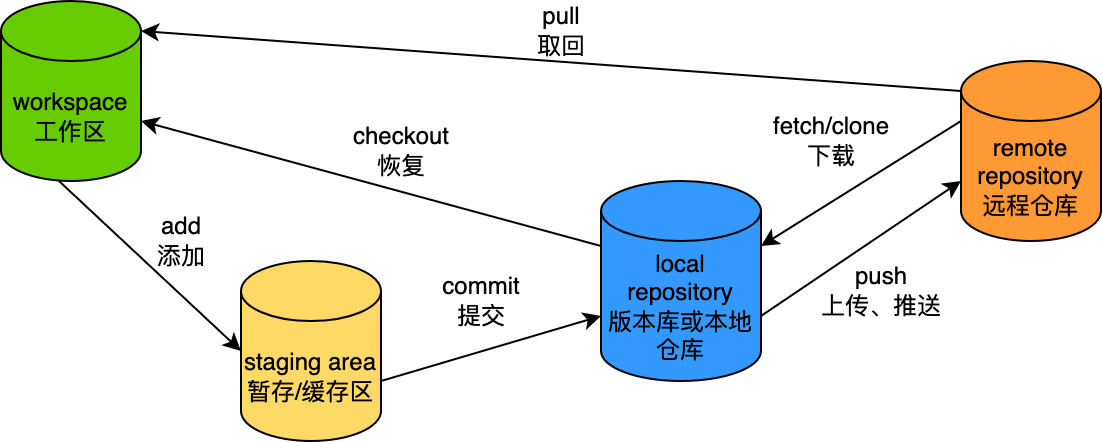
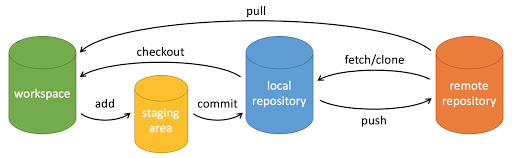
说明:
- workspace:工作区
- staging area:暂存区/缓存区
- local repository:版本库或本地仓库
- remote repository:远程仓库
配置好ssh 好后就能拉取推送代码到远端仓库了。
1.新建代码库
1
2
3
4
5
6
7
8
|
$ git init
$ git init [project-name]
$ git clone [url]
|
2.配置
Git的设置文件为.gitconfig,它可以在用户主目录下(全局配置),也可以在项目目录下(项目配置)。
1
2
3
4
5
6
7
8
9
10
11
12
13
14
15
16
17
18
19
20
21
22
23
24
|
$ git config --list
$ git config -e [--global]
$ git config [--global] user.name "[name]"
$ git config [--global] user.email "[email address]"
git config --global user.name "your name"
git config --local --list
git config --global --list
git config --system --list
git config --global user.name "kuangshen"
git config --global user.email "your email"
|
3.增加/删除文件
1
2
3
4
5
6
7
8
9
10
11
12
13
14
15
16
17
18
19
20
21
|
$ git add [file1] [file2] ...
$ git add [dir]
$ git add .
$ git add -p
$ git rm [file1] [file2] ...
$ git rm --cached [file]
$ git mv [file-original] [file-renamed]
|
4.代码提交
1
2
3
4
5
6
7
8
9
10
11
12
13
14
15
16
17
18
|
$ git commit -m [message]
$ git commit [file1] [file2] ... -m [message]
$ git commit -a
$ git commit -v
$ git commit --amend -m [message]
$ git commit --amend [file1] [file2] ...
|
5.分支
1
2
| git checkout zk_gle_ient.py
|
1
2
3
4
5
6
7
8
9
10
11
12
13
14
15
16
17
18
19
20
21
22
23
24
25
26
27
28
29
30
31
32
33
34
35
36
37
38
39
40
41
42
43
44
45
|
$ git branch
$ git branch -r
$ git branch -a
$ git branch [branch-name]
$ git checkout -b [branch]
$ git branch [branch] [commit]
$ git branch --track [branch] [remote-branch]
$ git checkout [branch-name]
$ git checkout -
$ git branch --set-upstream [branch] [remote-branch]
$ git merge [branch]
$ git cherry-pick [commit]
$ git branch -d [branch-name]
$ git push origin --delete [branch-name]
$ git branch -dr [remote/branch]
git branch -m <oldbranch-name> <newbranch-name>
|
6.标签
1
2
3
4
5
6
7
8
9
10
11
12
13
14
15
16
17
18
19
20
21
22
23
24
25
26
|
$ git tag
$ git tag [tag]
$ git tag [tag] [commit]
$ git tag -d [tag]
$ git push origin :refs/tags/[tagName]
$ git show [tag]
$ git push [remote] [tag]
$ git push [remote] --tags
$ git checkout -b [branch] [tag]
|
7.查看信息
1
2
3
4
5
6
7
8
9
10
11
12
13
14
15
| git status
位于分支 master
您的分支与上游分支 'origin/master' 一致。
未跟踪的文件:
(使用 "git add <文件>..." 以包含要提交的内容)
../../qz/
../metis/q.py
../metics/zhkai.sh
../user_yis/clt_og_21226/
../useralyis/et_pv.py
../user_sis/runt_pv.sh
../user_yis/ruiic_day.sh
../usersis/seer_econdlow_.json
k_goe_lnt.py
|
1
2
3
4
5
6
7
8
9
10
11
12
13
14
15
16
17
18
19
20
21
22
23
24
25
26
27
28
29
30
31
32
33
34
35
36
37
38
39
40
41
42
43
44
45
46
47
48
49
50
51
52
53
54
55
56
57
58
59
60
61
62
63
|
git status [filename]
$ git status
$ git log
$ git log --stat
$ git log -S [keyword]
$ git log [tag] HEAD --pretty=format:%s
$ git log [tag] HEAD --grep feature
$ git log --follow [file]
$ git whatchanged [file]
$ git log -p [file]
$ git log -5 --pretty --oneline
$ git shortlog -sn
$ git blame [file]
$ git diff
$ git diff --cached [file]
$ git diff HEAD
$ git diff [first-branch]...[second-branch]
$ git diff --shortstat "@{0 day ago}"
$ git show [commit]
$ git show --name-only [commit]
$ git show [commit]:[filename]
$ git reflog
|
8.远程同步
1
2
3
4
5
6
7
8
9
10
11
12
13
14
15
16
17
18
19
20
21
22
23
24
25
26
27
28
29
|
$ git fetch [remote]
$ git remote -v
$ git remote show [remote]
$ git remote add [shortname] [url]
git remote rename oldName newName
git remote remove origin
$ git pull [remote] [branch]
git pull origin master
$ git push [remote] [branch]
$ git push [remote] --force
$ git push [remote] --all
|
9.撤销
1
2
3
4
5
6
7
8
9
10
11
12
13
14
15
16
17
18
19
20
21
22
23
24
25
26
27
28
29
30
31
|
$ git checkout [file]
$ git checkout [commit] [file]
$ git checkout .
$ git reset [file]
$ git reset --hard
$ git reset [commit]
$ git reset --hard [commit]
$ git reset --keep [commit]
$ git revert [commit]
$ git stash
$ git stash pop
|
10.文档查询
11.其他
忽略文件
有些时候我们不想把某些文件纳入版本控制中,比如数据库文件,临时文件,设计文件等
在主目录下建立”.gitignore”文件,此文件有如下规则:
- 忽略文件中的空行或以井号(#)开始的行将会被忽略。
- 可以使用Linux通配符。例如:星号(*)代表任意多个字符,问号(?)代表一个字符,方括号([abc])代表可选字符范围,大括号({string1,string2,…})代表可选的字符串等。
- 如果名称的最前面有一个感叹号(!),表示例外规则,将不被忽略。
- 如果名称的最前面是一个路径分隔符(/),表示要忽略的文件在此目录下,而子目录中的文件不忽略。
- 如果名称的最后面是一个路径分隔符(/),表示要忽略的是此目录下该名称的子目录,而非文件(默认文件或目录都忽略)。
1
2
3
4
5
6
|
*.txt
!lib.txt
/temp
build/
doc/*.txt
|
参考:https://gitee.com/all-about-git